
Reliable native calling
The phone continues to handle the live call through the calling experience designed for the device.
TalkLayr Connect
TalkLayr Connect brings contacts, recent calls, colleague availability and useful caller context to compatible Android business phones.
It works alongside the phone’s native calling experience, giving people a clearer place to understand who is calling, find the right person and take the next useful action.
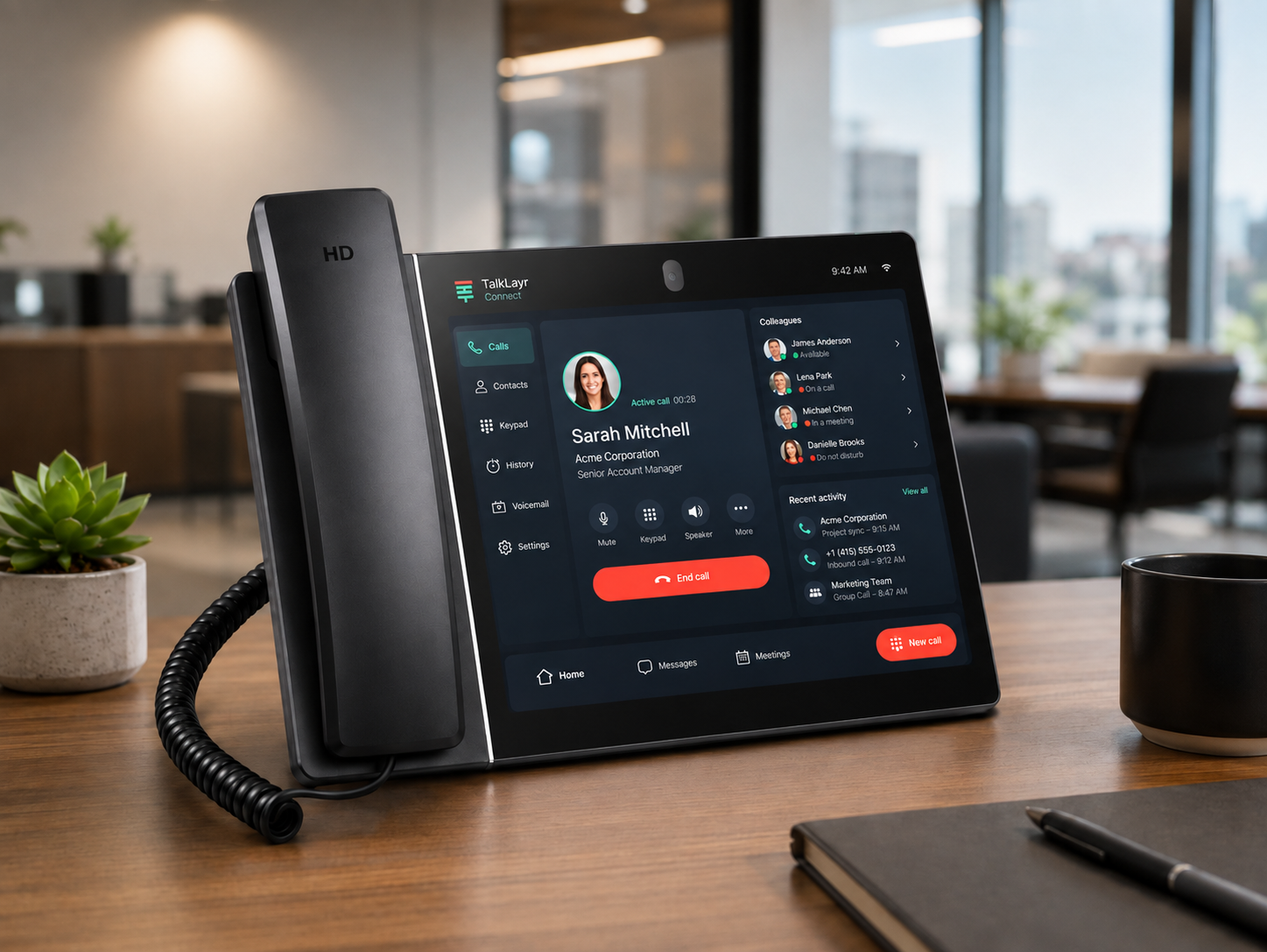
A companion to the call
TalkLayr Connect is designed to work alongside the phone’s native dialler.
When you start a call from Connect, the phone can use its familiar calling interface for the live conversation.
Connect remains the place where useful business context is brought together: the contact, the organisation, recent activity and the next action.
When the device permits it, the experience should return naturally to Connect after the call, rather than leaving the user stranded in a screen they no longer need.
Open a contact or recent conversation.
Move naturally from information to action.
The familiar device experience takes priority.
Continue from Connect when the device permits it.
The phone continues to handle the live call through the calling experience designed for the device.
Connect shows the information around the conversation, not only the number being called.
The app should help when it is useful and stay out of the way when the live call takes priority.
After the call, the user should be able to continue working from the same useful context.
Connect complements the phone rather than asking the user to relearn how calling works.
Caller context
A number on its own rarely tells the whole story.
TalkLayr Connect can bring together the caller’s identity, organisation and recent activity so the person answering has useful context before the conversation develops.
That can help a receptionist greet someone more naturally, a service team recognise a returning issue or a sales team understand the relationship behind the call.
The conversation can begin with understanding rather than identification.
Contacts where you need them
Contacts should not be trapped inside one phone or hidden behind manufacturer-specific menus.
TalkLayr Connect brings shared business contacts, personal favourites, pinned people and recent activity into a consistent search experience.
Find a person or organisation, see the useful context and move directly into the next conversation.
Shared and personalUse consistent phone books, favourites and pinned contacts.
People and organisationsSearch by the relationship behind the number.
Click-to-callStart the call directly from useful information.
Platform-backed dataKeep information consistent across TalkLayr and supported devices.
The right contact should be easy to find, whichever supported phone a person is using.
Explore Phone BooksTeam availability
A transfer is more useful when there is a reasonable expectation that someone can answer it.
TalkLayr Connect can present supported presence information alongside colleagues and teams, helping users make a more informed choice before calling or transferring.
Presence should guide the decision, not pretend to know more than the platform and device can report accurately.
From context to call
Finding information should lead naturally to the action it supports.
From a contact, organisation or recent call, TalkLayr Connect can help the user begin the next conversation without moving through unrelated screens.
Connect reduces the distance between understanding what happened and doing what should happen next.
Recent conversations
A useful call history should support the work that follows the conversation.
TalkLayr Connect can present recent calls with clear identity, status and outcome information, alongside practical actions such as returning the call, saving the contact or opening more detail.
Recent calls become a working list of conversations that may still need attention.
Explore Call HistoryDesigned for the desk
A modern Android business phone already provides a capable screen, touch controls and familiar call handling.
TalkLayr Connect makes better use of that space by bringing the wider platform closer to the device.
The result is a phone that can feel more connected to the people, journeys and information around every call.
The desk phone becomes an active part of the working platform rather than only an endpoint.
Supported devices
TalkLayr Connect is being designed for selected Android desk phones with suitable screen size, performance, telephony integration and device-management capability.
Initial development is focused on carefully chosen devices rather than claiming support for every Android phone.
Models being considered or used during development include Grandstream GXV3380 and Yealink VP59.
Final support will depend on device testing, firmware behaviour and the quality of the complete working experience.
Compatibility is subject to model and firmware testing.
Compatibility is subject to model and firmware testing.
Manufacturer names identify devices being evaluated. They do not imply endorsement, partnership or exclusivity. A supported-device directory will provide confirmed models, firmware guidance and deployment notes when testing is complete.
One TalkLayr experience
TalkLayr Connect is not intended to become a standalone island on the desk.
Its value comes from the wider TalkLayr services behind it.
Connect is the desk-phone expression of the same platform used to design journeys, manage contacts and understand calls.
Experience TalkLayr Connect
Book a guided demonstration of TalkLayr Connect and see how contacts, call history, presence and caller context can work alongside the native phone experience.
 Caller context